Create a plan
A plan decides what a day costs and what it includes. Every amount you enter is a gross price.
The first plan is one of the three start tasks. After that you create as many as you have offers. Every plan describes a pricing model, what it includes and whether members may pick it themselves.
Decide beforehand whether the plan charges per day used, has a base price with included days, or is a flat monthly price. The pricing model decides which fields appear next.
- Open the plan list.
In the app
Setup, section Prices and hours, row Plans. The screen is called Subscription plans.On the web
The Plans entry in the sidebar under Management. - Start a new plan.
In the app
Tap New plan. The app first asks Where do you want to start? and offers four templates: Pay as you go, Flex Desk (a fixed monthly price, any day, no fixed desk), Fix Desk (a fixed monthly price, a desk of their own) or Custom. Pick one and tap Continue. A template only prefills the form.On the web
Click Add Plan. Above the form, Where do you want to start? offers the same templates as the app. A click prefills the form, Custom empties it again.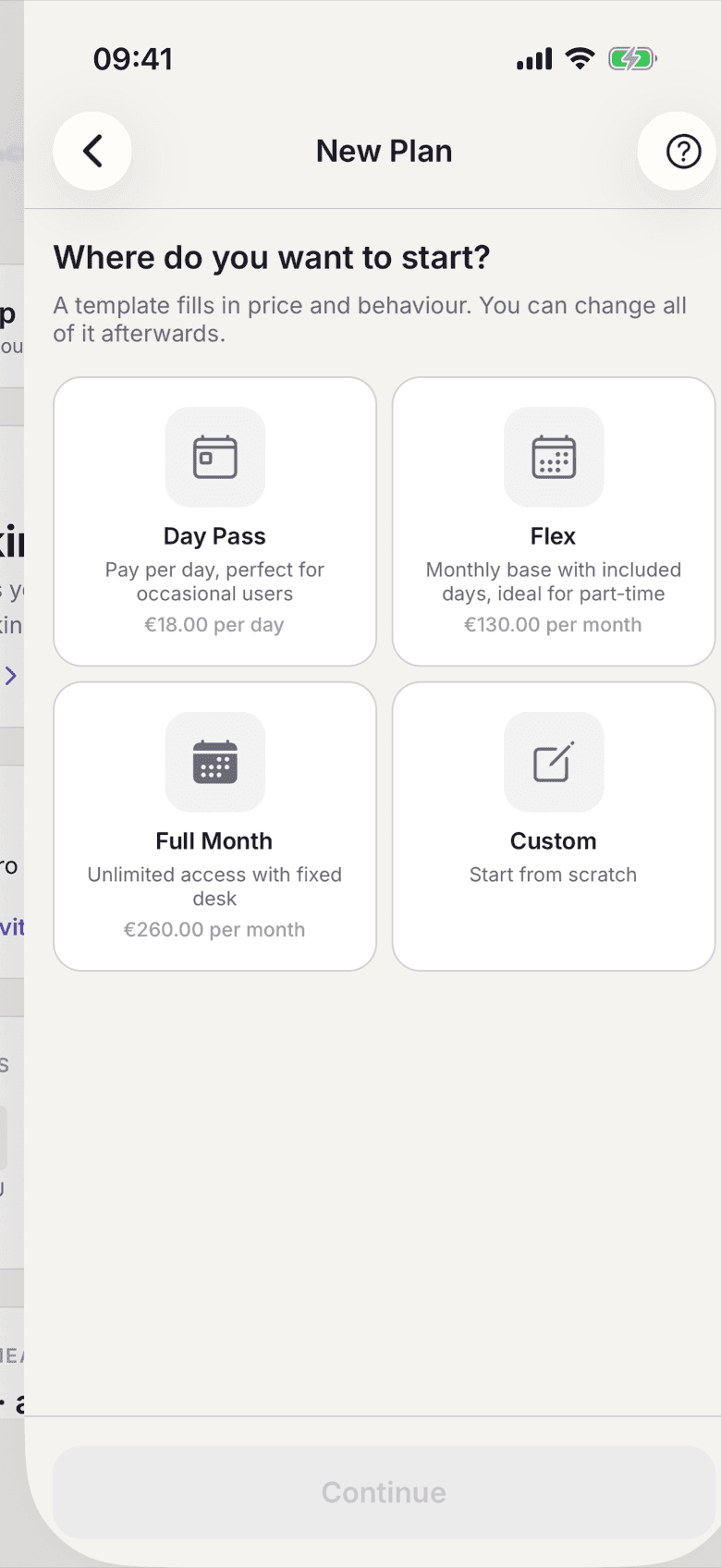
Template picker when creating a plan - Enter the Display Name. Members read it in the app, on the contract and on the invoice. Selfdesk derives the Internal Name from it; it is for you only and sits, together with the order in the list, under More at the end of the form.
- Pick the Pricing Model: per day, a base price with included days, or a fixed monthly price.
- Enter the amounts. Every price field is a gross price, which is what a member pays.
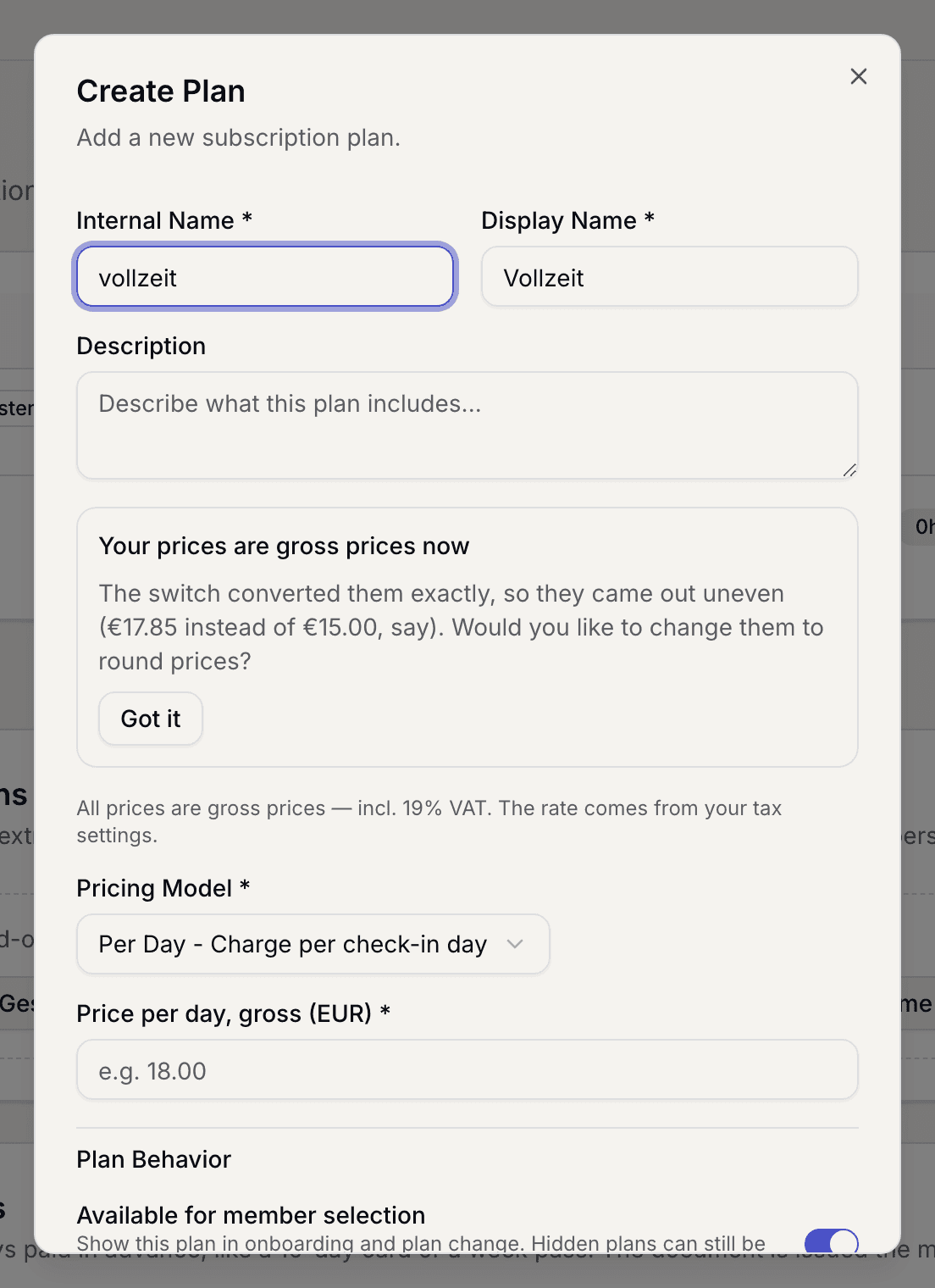
Form with the pricing model and the price fields - Set Behavior: whether members have to check in every day and whether the plan includes a fixed desk.
- Set Room Booking. If rooms should cost members on this plan nothing, turn on Rooms free. Otherwise set how many hours are included and what percentage discount on the room's price applies after that; 0 % means the full room price. You set the price itself on the room, see Create a room.
- Decide whether members may pick the plan themselves. In the app the switch is called Publicly visible, on the web Available for member selection. With it off, the plan appears neither in the plan picker nor in the price list, and you assign it by hand.
- Save.
What applies here
- The amounts a template fills in are suggestions. They are linked to nothing and are never used as a fallback anywhere. Pay as you go and the price per extra day start at the day price of your pay-as-you-go plan, as long as there is one.
- Grey amounts with “e.g.” are examples, not values. A field is only filled once you enter something.
- The plan without a contract has no discount on rooms. Members without a contract pay the same room price as day guests.
- An empty price field cannot be saved, Included days neither. If you mean 0 € or 0 days, enter 0. There is no silent fallback to a default amount.
- A plan has no VAT rate of its own. The rate belongs to your space. See Prices are final prices.
- You change the prices of an existing plan on the plan itself. Two steps ask from which billing month and to whom. See Change a price.
- Every change to a plan in the price list creates a new version by itself. See The four legal documents of your space.
- Co-users per contract says how many people a member on this plan may take along. That works on plans with an allowance or a fixed desk, not on plain day prices. See Manage co-users.
Duplicate a plan
For a second, similar plan you start from an existing one.
In the app
Open the plan and tap Duplicate plan at the bottom.On the web
In the plan list, open the ⋯ menu on the plan and choose Duplicate.The form then holds every term of the plan: pricing model, the prices of the current billing month, included days, room hours, room discount, behaviour and co-users. The name reads “Copy of …”, the internal name gets a number added. Change what should differ and save.
- Members do not come along, nor do the original's price history and planned prices.
- There is only one pay-as-you-go plan per space; it cannot be duplicated.
When it does not work