View orders
The page Orders shows every upcoming room booking with extras and, per day, the total you need to buy or order.
Whoever books a room with extras expects coffee, bread rolls or a projector on the day. The page Orders collects that for you: every upcoming booking with extras, from guests and from members, sorted by day.
-
Open Room booking extras and in it Orders.
-
Read the total per day: each extra with the quantity needed that day, for example "Drinks for 12". That is your shopping list.
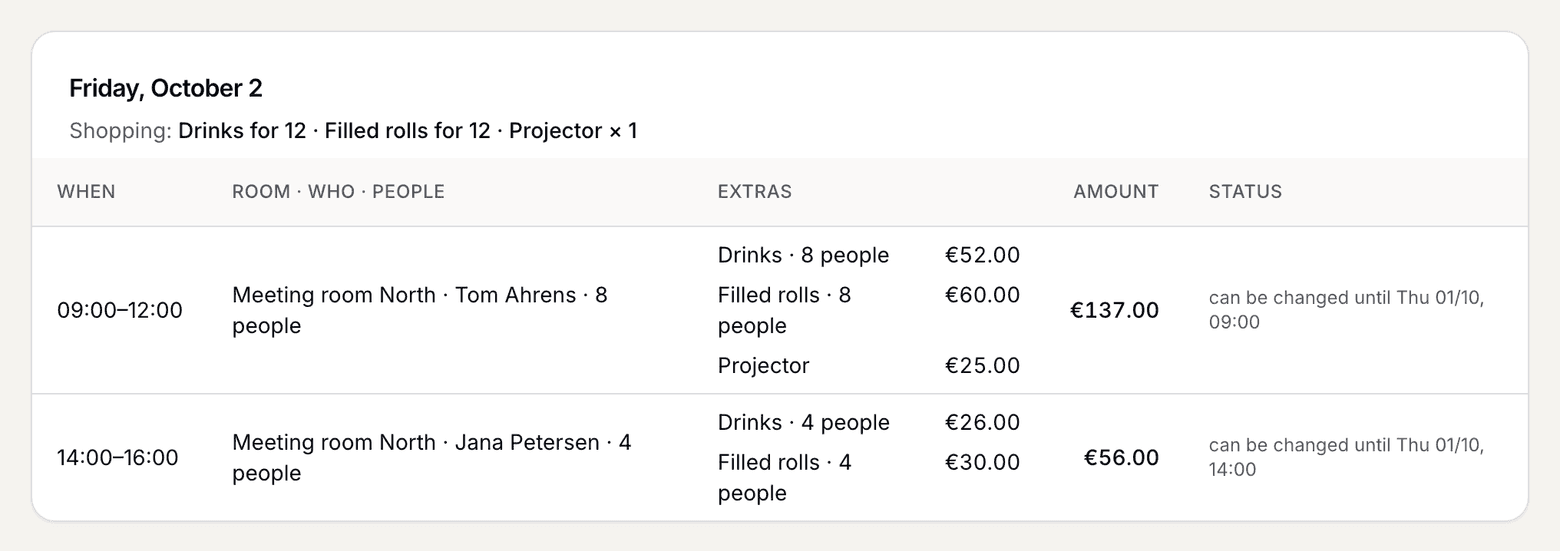
A day in Orders with the shopping list and two bookings with extras -
Below it is each booking with time, room, who booked, people, the extras and the amount.
-
Look out for fixed: this extra has reached its lead time and will not change any more. From now on you can order it without the quantity shifting.
What applies here
- Ordering is done by hand. selfdesk sends no order to a café or supplier. The list is your template for it.
- As long as an extra is not fixed, the quantity can change. Members change their extras until the lead time, and whoever cancels before it does not pay for them. See Lead time and cancellation for extras.
- A cancelled booking with fixed extras stays in the list as cancelled, and its fixed extras count in the day's total. They are paid for or on the member's invoice.
- Guests appear next to members, with the name from their order.
When it does not work