Upload your terms of use
The terms of use are your own PDF and they are optional. Without an uploaded document, signup asks for no acceptance.
Terms of sale, right of withdrawal and price list are generated by selfdesk from templates. The terms of use are the only legal document you write yourself and upload as a PDF. That is where your house rules live: noise, guests, kitchen, keys.
Before you start: the PDF must be 10 MB or smaller.
- Open Setup and tap Terms of use in the Legal texts section.
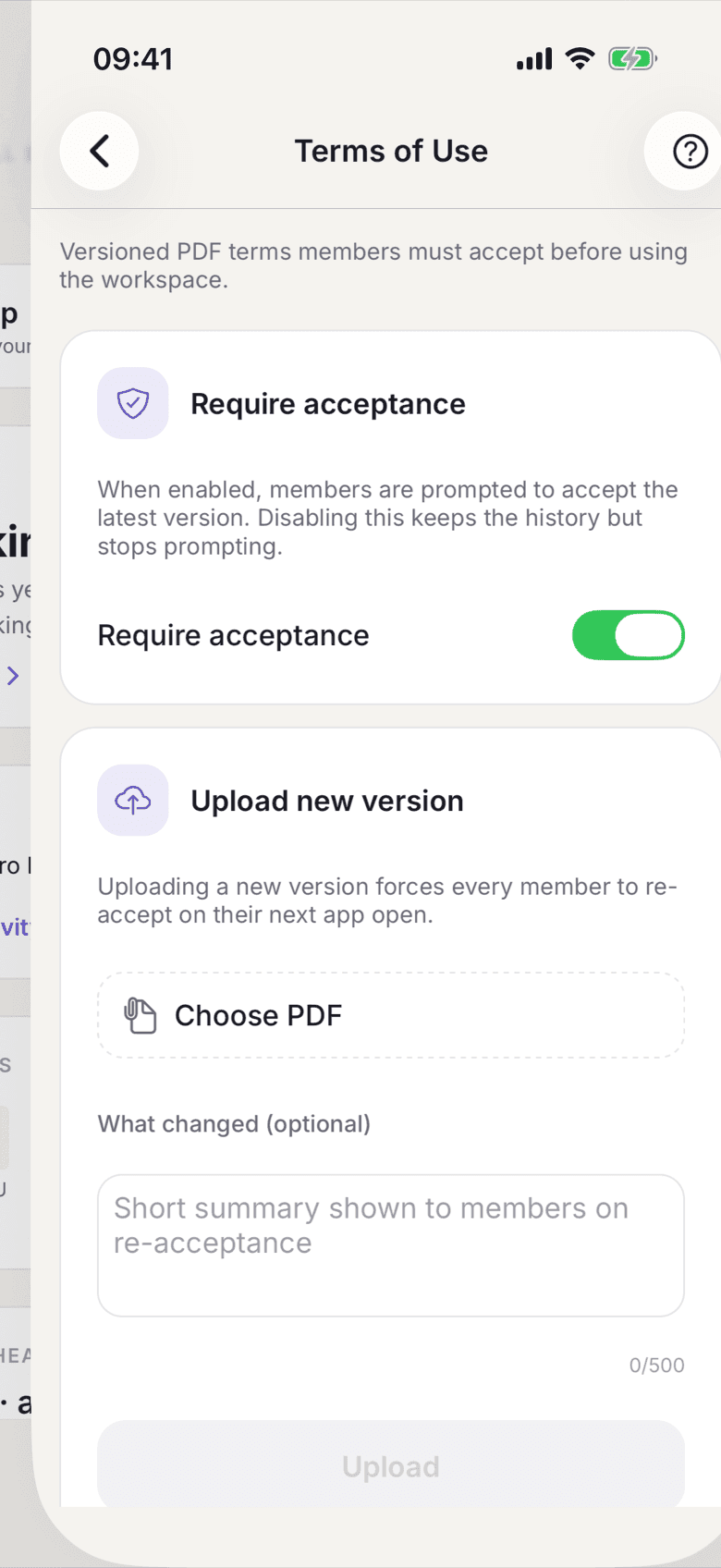
Terms of Use with the Require acceptance switch - Switch on Require acceptance if members should accept the latest version.
- Tap Choose PDF and pick your file.
- Write one sentence under What changed. Members see it when they are asked to accept again.
- Tap Upload.
- Check in the Version history that the new file is listed as Current version.
What applies here
- Without an uploaded document nothing is required at signup. The switch alone enforces nothing.
- Every new version resets acceptance. All members have to accept again on their next app open.
- The Version history counts acceptances per version. That is your record of who accepted which version.
- Deleting only works on the latest version and only while nobody has accepted it. Otherwise you get This version has been accepted by users and cannot be deleted.
- Switch Require acceptance off and the history is kept, members are simply no longer asked.
- A new member only gets the terms of use attached to their welcome email if the document exists.