Your space changes its prices
If your space asks you to agree to a new price, you see a notice in the app and on the web. As long as you do not agree, your previous price still applies.
If your space changes prices that apply to you, you learn about it in one of two ways. If the new price applies to everyone, you get an email, depending on what your space chose. If your space asks for your agreement, you get an email and see the notice New prices from … on the home screen.
- Tap or click View request in the notice. The sheet names your plan, the month and, for each price, the previous and the new value. If your space wrote a message, it appears below.
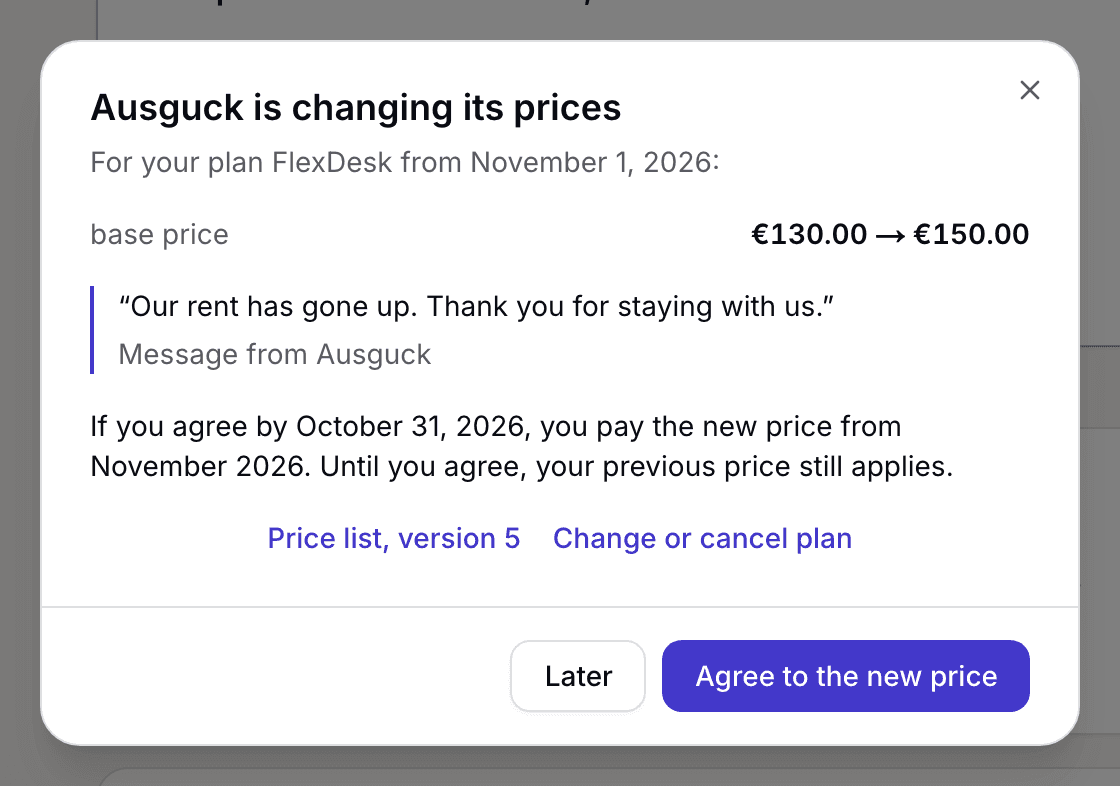
The space's request with the previous and the new price and the Agree to the new price button - Price list, version … opens the price list with all prices and their months.
- Choose Agree to the new price or Later.
After you agree, it says from which month the new price applies to you. Later closes the sheet. In your profile under My plan, the notice Your previous price still applies. stays until you have agreed. There you can also agree later, change your plan or cancel.
What applies here
- If you agree before the month from which the new price applies, you pay it from that month. If you agree later, you pay it from the month after you agree. The sheet names the month.
- As long as you do not agree, you pay the previous price. You can keep booking and opening the door.
- If you have a company seat, your company's billing contact agrees. You see the notice without a button.
- If your space asks you to agree to the price list itself, the button reads Agree to the price list. That changes no price.
- Every invoice names the version of the price list it was calculated by.
- When you choose a plan, an announced price shows with its date, for example “from 1 December”, next to Your price.
When it does not work